DaVinci Resolve 21.1 Is Quietly Turning AI Into Your Editing Assistant
Dixit Kamal — September 12, 2026
The biggest change in DaVinci Resolve 21.1 might not be another AI feature. It might be the fact that you can now tell AI what you want DaVinci Resolve to do.
There is a section buried deep inside the latest DaVinci Resolve 21.1 Reference Manual.
Page 4,318, to be exact.
The section is titled “Using DaVinci Resolve with AI Assistants.”
At first glance, it might sound like another AI feature in a software update that already contains plenty of them.
It isn’t.
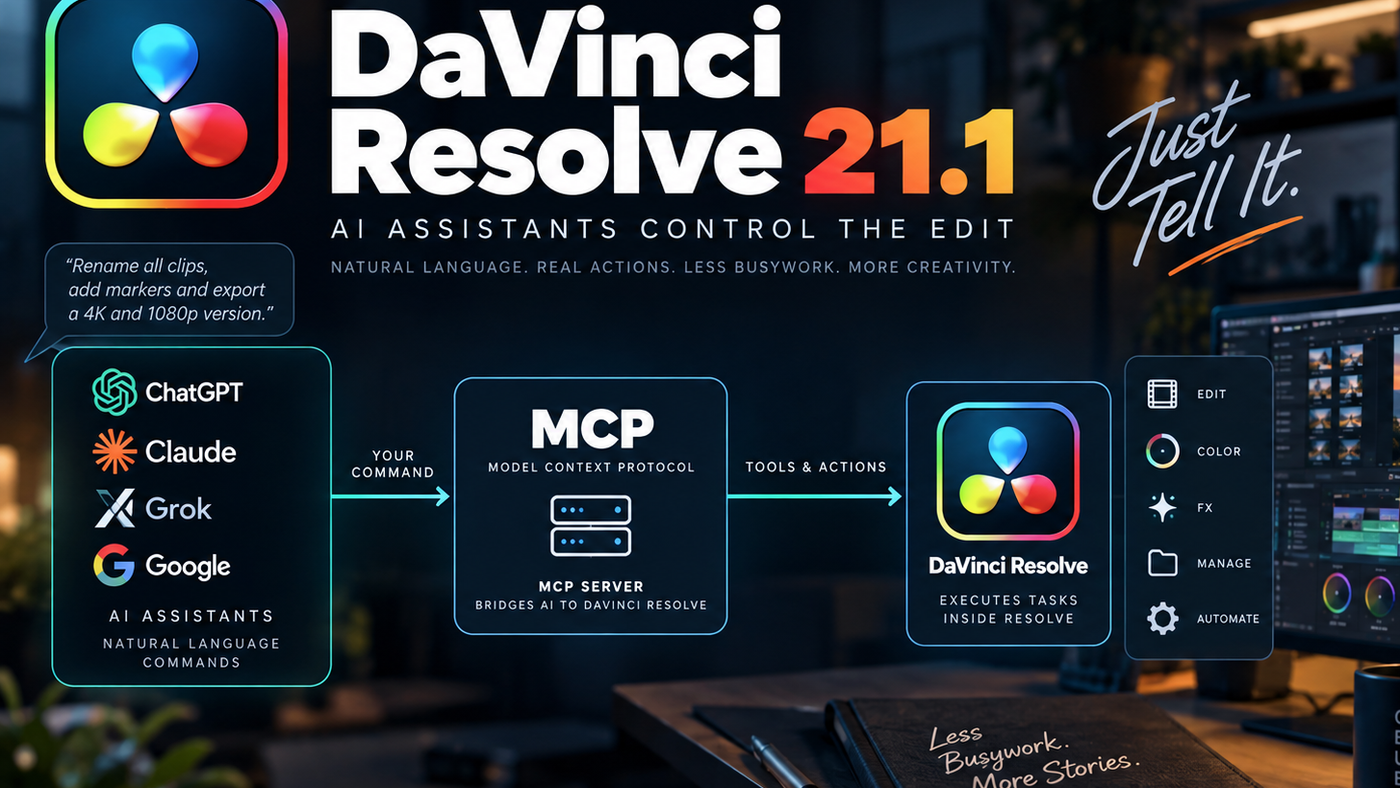
DaVinci Resolve Studio 21.1 introduces an MCP server, allowing compatible AI assistants to communicate with DaVinci Resolve and perform supported tasks through natural-language instructions.
In other words, instead of asking AI how to use DaVinci Resolve, you can increasingly ask AI to use DaVinci Resolve for you.
And that is a much bigger deal.
So, What Is MCP?
MCP stands for Model Context Protocol.
The easiest way to understand it is to think of MCP as a common language that allows AI applications to communicate with other software.
Anthropic, which introduced the protocol, compares MCP to USB-C. Instead of creating a completely different connection for every device, you have a common standard that different systems can use.
The same basic idea applies here. Instead of Blackmagic having to build a separate AI integration for Claude, another for ChatGPT, another for Google, and another for every AI system that comes along, DaVinci Resolve can expose supported capabilities through MCP.
The basic chain looks like this:
You → AI assistant → MCP → DaVinci Resolve
You give the instruction to the AI. The AI determines what needs to happen. DaVinci Resolve performs the operation.
That final part is what makes this different from a traditional chatbot.
This Isn’t Just AI Giving You Instructions
Imagine you ask ChatGPT:
“How do I rename all the clips on V1 sequentially?”
A normal AI assistant might explain the steps: open this menu, select these clips, choose this option, enter the naming format.
With DaVinci Resolve’s MCP integration, the concept is different.
You could instead give the AI an instruction such as:
“Rename every clip on V1 as Interview_A_001, Interview_A_002, Interview_A_003…”
The AI can communicate with DaVinci Resolve and perform the supported operation.
You are no longer asking:
“How do I do this?”
You are saying:
“Do this.”
That is the distinction.
What Can DaVinci Resolve’s AI Integration Actually Do?
The examples Blackmagic provides are surprisingly practical. You can ask an AI assistant to perform tasks such as preparing multiple render formats, renaming clips, creating markers, exporting marker information, applying LUTs, comparing project settings, and preparing timelines for different aspect ratios.
Think about how much of an editor’s day consists of exactly this kind of work.
Not cutting. Not storytelling. Not creative decisions.
Just operational work.
You finish a project. Then the real grind begins: create the master, create the client version, create the proxy, create the social-media version, rename the clips, check the settings, add markers, export information, and make sure everything is configured correctly.
None of this is particularly creative, but it can eat hours.
And that’s where AI agents become genuinely interesting.
The Killer Feature Isn’t “AI Edits Your Movie”
This is where the conversation around AI and editing often goes in the wrong direction.
People hear “AI can control DaVinci Resolve” and immediately imagine an AI sitting down and editing an entire documentary.
That’s not what makes this technology interesting.
The immediate value is much simpler:
AI can take care of the operational work surrounding the creative process.
Imagine finishing a wedding film. Instead of manually setting up multiple deliverables, you could tell your assistant:
“Render this timeline as a ProRes 422 HQ master, create a 4K H.265 client copy, and generate a 1080p H.264 proxy.”
Or, while preparing content for social media:
“Create a 9:16 version of this timeline and prepare it for vertical delivery.”
Or, while organizing an interview project:
“Rename all interview clips sequentially and add markers to the selected moments.”
These aren’t creative decisions. They’re tasks.
And tasks are exactly what computers are supposed to automate.
This Is Where AI Becomes an Agent
There is a fundamental difference between an AI that generates information and an AI that takes action.
For years, we’ve mostly interacted with AI like this:
Question → AI → Answer
Now we’re moving toward:
Goal → AI → Tools → Action → Result
That’s the beginning of agentic software.
DaVinci Resolve is an interesting example because it is a professional application with hundreds of menus, settings, tools, and workflows. Instead of remembering where everything lives, you can increasingly describe the outcome you want.
The interface doesn’t disappear. But for certain tasks, the interface becomes optional.
Your AI Doesn’t Replace Resolve. It Operates Through Resolve.
This distinction matters.
The AI isn’t rendering your video instead of Resolve. It isn’t replacing the DaVinci Resolve engine. Resolve is still doing the actual work.
The AI is effectively becoming another interface into Resolve.
Traditionally, you interact with Resolve through:
Mouse + keyboard + menus + panels + buttons
With MCP, you can add:
Natural language + AI assistant
That’s powerful because computers have traditionally required us to learn the computer’s language. Now, the computer is increasingly learning how to interpret ours.
Blackmagic Isn’t Locking You Into One AI
Another interesting part of this implementation is that Blackmagic isn’t simply creating a “Blackmagic AI Assistant” and forcing users into one ecosystem.
The setup documentation shows support for multiple AI assistants, including Claude Desktop, Claude Code, Codex in ChatGPT, Google Antigravity, and Grok.
That’s one of the advantages of using an open protocol.
The AI can change. The editing application stays the same.
Today, you might prefer one AI assistant. Tomorrow, another model might be significantly better at reasoning, automation, or understanding your workflow.
You don’t necessarily need a completely new integration every time.
The protocol provides the bridge.
There Is a Serious Security Consideration
Giving AI access to an application is fundamentally different from asking it a question.
If an AI can execute scripts and interact with your system, you need to think about permissions.
Blackmagic specifically warns that scripts created by an AI assistant have the same access to disk, network, and other system resources available to that assistant.
That is important.
You don’t want to give an AI agent access to a production environment containing years of client footage and then tell it:
“Organize everything.”
AI is powerful precisely because it can take action. That also means mistakes can become actions.
For professional workflows, the sensible approach is still:
Ask → Review → Execute → Verify
Especially when you’re dealing with deleting files, overwriting projects, moving media, or changing important project settings.
Automation should remove work — not remove your judgment.
So, Is AI Going to Replace Editors?
Probably not in the way the headlines suggest.
But it could change what being an editor actually means.
A lot of editing work isn’t creative. It is technical, administrative, repetitive, and preparatory. Those are exactly the areas where AI agents are becoming increasingly capable.
The editor who spends thirty minutes manually preparing five deliverables could eventually spend thirty seconds describing what needs to be created.
The editor still decides what the story should feel like, which shot should stay, where the music should drop, which performance is emotionally right, when the scene should breathe, and what the audience should see.
AI does not automatically answer those questions.
It can potentially handle much of the work surrounding them.
And that distinction is important.
The Future Editor May Spend Less Time Operating Software
For decades, professional creative software rewarded people who knew where everything was.
The best editors knew the shortcuts. They knew the menus. They knew the workflows. They knew exactly which settings to change.
That knowledge isn’t becoming useless.
But the advantage may gradually shift.
Instead of being the person who knows where every button is, the valuable editor may increasingly be the person who knows what should happen — and how to communicate that clearly to an AI system.
That’s a significant change.
You don’t stop being an editor.
You become the person directing both the creative process and the machines doing the repetitive work.
Why This Tiny Section of the Resolve Manual Matters
I was surprised to see that a manual containing more than 4,300 pages can make an additional page feel almost insignificant.
But sometimes the most important change isn’t the feature that gets the biggest marketing headline.
It’s the infrastructure underneath it.
DaVinci Resolve already has AI-powered tools for searching footage, transcription, object isolation, tracking, and other creative tasks.
MCP introduces another layer.
Instead of simply adding more AI features to Resolve, Blackmagic is giving external AI systems a way to interact with the application itself.
That changes the relationship between the editor and the software.
And this is probably only the beginning.
Today, I might tell an AI to rename clips or prepare renders. Tomorrow, these systems could coordinate post-production workflows across my NLE, image editor, audio software, storage, and delivery systems.
The long-term question isn’t whether AI can make a better cut than me.
The more interesting question is:
How much of the work between “I know what I want” and “the final video is delivered” will I still have to do manually?
DaVinci Resolve 21.1 gives us a glimpse of what the answer might look like.
And if this is where professional creative software is heading, the next generation of editors may spend considerably less time operating software — and considerably more time directing it.